Audio Capture
Real Devices Only
Audio Capture is a functionality that gives you the ability to record the audio stream generated by your native mobile app (Android or iOS/iPadOS) during a live or automated real device test.
What You'll Need
- A Sauce Labs account (Log in or sign up for a free trial license)
- A native Android, iOS, or iPadOS mobile app.
Supported Platforms and Frameworks
| Android 9 and below | Android 10 | Android 11 | Android 12 and above | iOS (all versions) | |
|---|---|---|---|---|---|
| Audio streaming during Live Testing | ❌ | ❌ | ❌ | ✅ | ✅ |
| Audio recording in Live and Automated Test Reports | ❌ | Automated only | Automated only | ✅ | ❌ |
| Text to speech audio streaming during Live Testing via Talkback/VoiceOver | ❌ | ✅ | ✅ | ✅ | ✅ |
| Text to speech audio recording in Live and Automated Test Reports via Talkback/VoiceOver | ❌ | ❌ | ❌ | ❌ | ❌ |
Using Audio Capture for Automated Tests on Real Devices
Audio capture works out of box for automated tests on iOS. On Android, if the app does not define any restrictions in its manifest, then it will also work out of box.
To bypass audio capture restrictions defined in manifests of Android apps, you need to use the following capabilities:
Now you can start your automated testing session. Your audio recording will be captured and be part of the video recording on the Test Results page.
Using Live Audio Streaming during a Live Testing session on Real Devices
Real Devices Only
You need to launch a Live Testing session on a real device, and the audio will be streamed to your browser automatically without any configuration. If it doesn't launch for you, you can manually launch it by clicking Performance Mode button under Device Settings menu in the live testing toolbar.
The Audio Streaming feature ensures a better digital experience by validating audio playback and testing user flows that require audio testing in the early stages of the development lifecycle.
With the Audio Streaming feature, you are able to hear the sound your application is making during a Live Testing session. It allows you to validate audio streams, notification sounds, and animations.
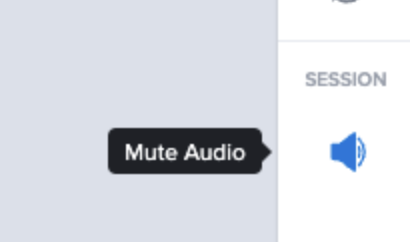
You will be able to mute and unmute the sound during your session by clicking on the mute/unmute button on the toolbar:
We are using Twilio's webrtc service in order to stream audio from a Real Device to your computer. If audio can't be heard, make sure the network requirements from Twilio are respected. It is possible to check compliance using the following network test.
Live Streaming Limitations
- Android TalkBack is ONLY supported on Private devices, reach out to our Support Team or your Sauce Labs representative to get this configured.
- Website testing is not yet available on Android.
Using Audio Capture and Streaming on your Android Device
You will have the capability to capture audio on Android 10 and later versions. On private devices, you can test TalkBack on Android 12 and later versions.
Once audioCapture is enabled, the status bar will display the recording icon.
We use native Android audio capture for seamless audio capture for our real devices experience. Your test results and sessions are secured, and can only be viewed by you.
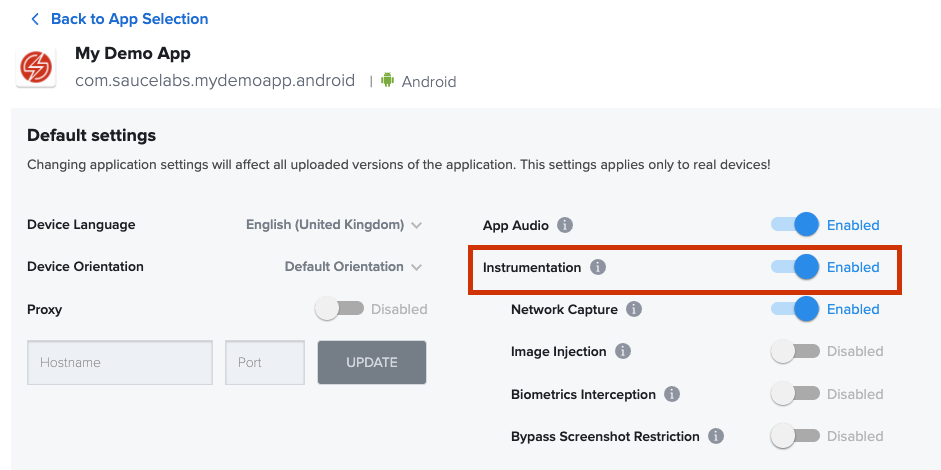
If your apps's manifest.xml file defines android:allowAudioPlaybackCapture="false", you need to enable instrumentation to have Audio Capture work for your apps.
Enabling TalkBack/VoiceOver on your Devices
To enable accessibility tools and use text-to-speech audio streaming during live testing, see Accessibility Testing for setup instructions on both iOS and Android.
Using Audio Capture on iOS/iPadOS
Audio capture is supported on all our iOS devices. Additionally, you can validate the sounds produced by your application, enable VoiceOver, and verify its output.
Accessing the Audio in Your Test Tesults for Automated Test
The audio recording will be included in the video recording for automated tests, which you can play back and download from the built-in media player on the Test Results page.
You can also download the video file with the included audio stream programmatically using the following API request:
curl --compressed \ -O https://{SAUCE_USERNAME}:{SAUCE_ACCESS_KEY}@{DATA_CENTER}.saucelabs.com/v1/rdc/jobs/{JOB_ID}/video.mp4
Limitations
- Emulators and simulators are not supported.
- Website testing is not yet available on Android.
- Streaming and recording audio from phone calls is not supported.