Integrating the iOS SDK
Beta release
The Sauce Mobile Beta SDK is in beta. The artifact names and the API are final; this documentation can still change. Share feedback with your Sauce Labs representative.
Integrating the Sauce Mobile Beta SDK into your app helps you better understand how your app performs on real devices. It tells you when and how people are using your app, and provides you with any metrics you may need to optimize your user experience and code. You get to:
- Track app use.
- Record screen video and other metrics.
- Understand user flow, using checkpoints.
- Grab NSLogs from client and report to server.
- Collect in-app feedback from your testers.
The SDK does not install a crash handler. Crash reporting is provided by Backtrace (Sauce Labs Error Reporting), and the two SDKs are designed to run in the same app. Initialize Backtrace first, then start the SDK with beginWithoutCrashHandler. See Using Sauce Mobile Beta with Backtrace.
Adding the SDK
The SDK for iOS is distributed with Swift Package Manager. The current release is 2.3.0 and requires iOS 13 or later.
Swift Package Manager
The CocoaPods pod SauceMobileBeta is not published yet. Use Swift Package Manager to add the SDK.
Screenshots were taken with Xcode 13.1. The steps are the same in current Xcode versions.
| Item | Value |
|---|---|
| Package URL | https://github.com/testfairy/testfairy-ios-sdk-swift-package |
| Package product | SauceMobileBeta |
| Module to import | TestFairy |
| Dependency Rule | Exact Version 2.3.0 |
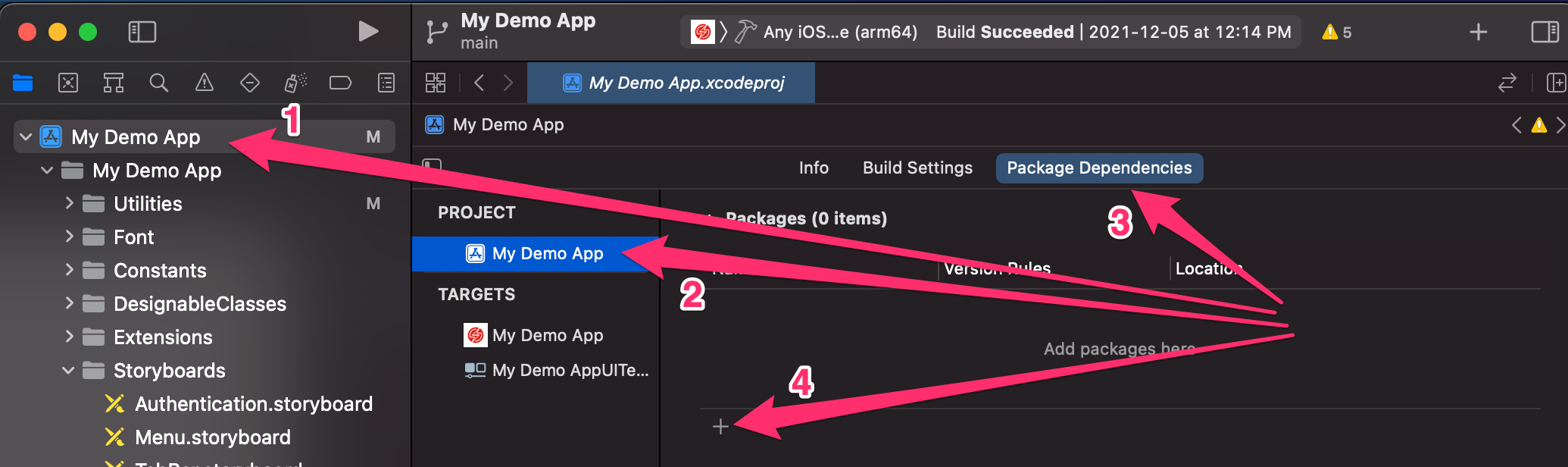
- Select your project from the Xcode navigator to open your project's configuration.
- Make sure your project is selected from the Project and Target list.
- Click the Package Dependencies toolbar item.
- Click the '+' icon to add a package.
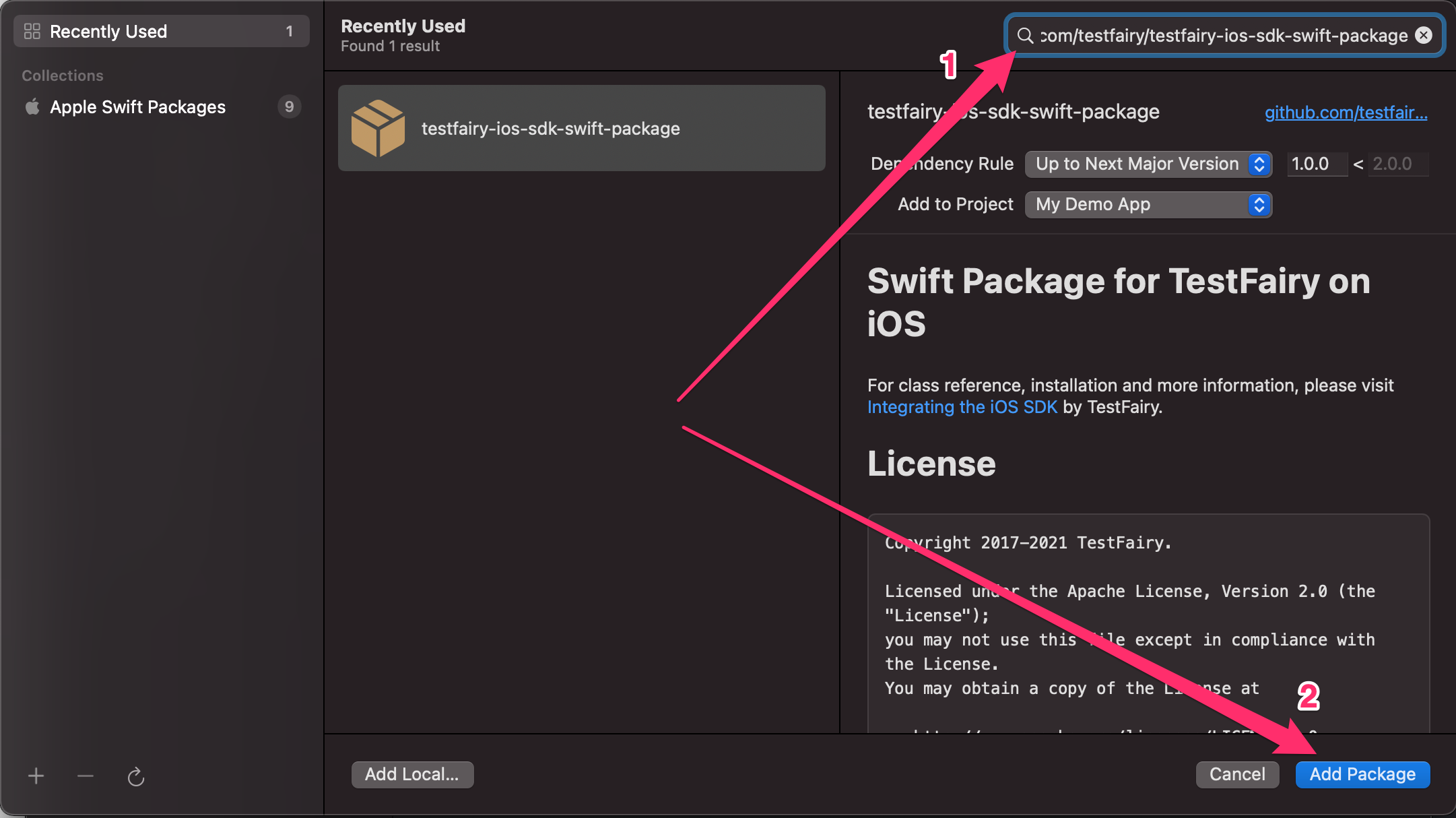
- In the newly opened dialog, enter the Sauce Mobile Beta package URL
https://github.com/testfairy/testfairy-ios-sdk-swift-packagein the top right search bar. - Set the Dependency Rule to Exact Version and enter
2.3.0. - Click Add Package.
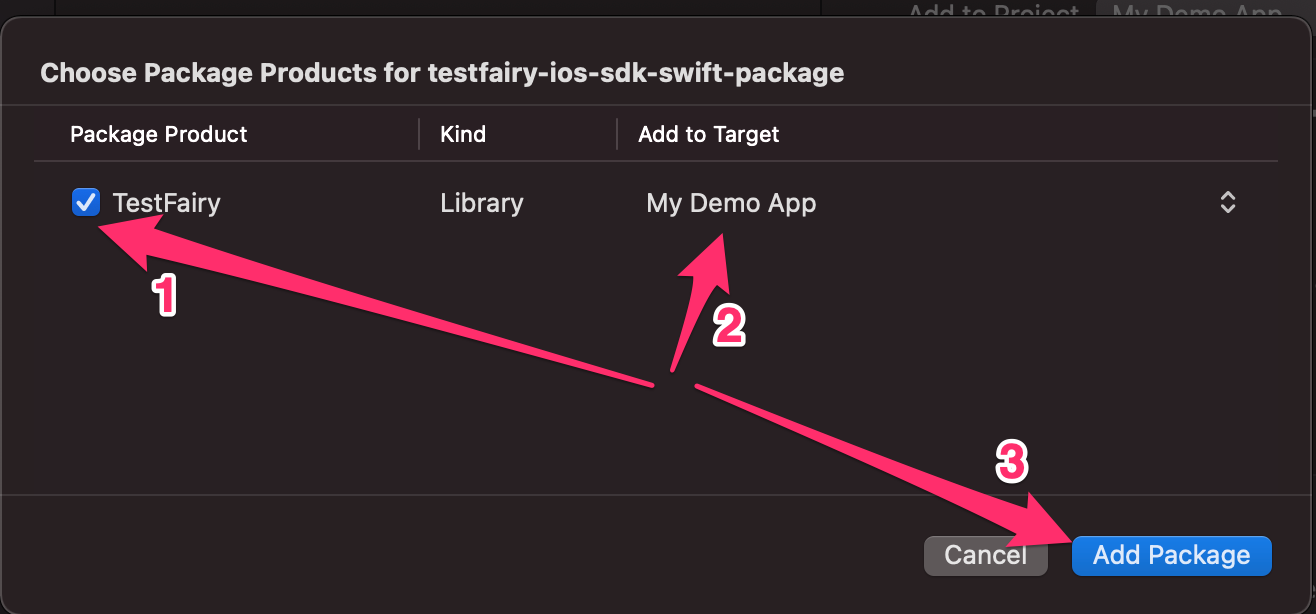
- After the package has been downloaded, in the newly opened dialog, make sure the
SauceMobileBetaproduct is selected in the "Package Product" column. - Make sure the right target is selected in the "Add to target" column.
- Click Add Package.
Pin the exact version and update it deliberately, so a new SDK release never reaches a build you have not tested. The product name is SauceMobileBeta and the module name is TestFairy.
If you declare dependencies in a Package.swift manifest instead:
dependencies: [
    .package(url: "https://github.com/testfairy/testfairy-ios-sdk-swift-package.git", exact: "2.3.0")
],
targets: [
    .target(name: "MyApp", dependencies: [
        .product(name: "SauceMobileBeta", package: "testfairy-ios-sdk-swift-package")
    ])
]
Initializing the SDK
Start the SDK with beginWithoutCrashHandler. It starts a session without installing a crash handler and forces the TFSDKEnableCrashReporterKey begin option to NO, even if you pass YES. begin also starts a session without a crash handler. Use beginWithoutCrashHandler to make the intent explicit. When Backtrace is part of the app, initialize Backtrace before this call. See Using Sauce Mobile Beta with Backtrace for the full initialization order and how the SDK writes the sauce.correlation_id it generates for every session to BacktraceClient.shared.
Replace <sauce-mobile-beta-token> and <server-endpoint> with your values.
Both values are in Organization Settings > SDK Settings on your Mobile App Distribution dashboard, under the organization that owns the app. Only Account Owners and Org Admins can open that page. See Organization Settings.
- SDK App Token: the organization-wide token your app starts sessions with. Regenerating it invalidates the previous token for every build that still carries it.
- Server Endpoint: the URL the SDK sends session data to, in the form
https://<host>/services/. It is specific to your region or private instance, so copy it exactly. If it reads Not configured, contact Sauce Labs support before you ship a build.
Pass the endpoint to setServerEndpoint before beginWithoutCrashHandler. The SDK's built-in default server is no longer in service: an app that skips this call starts no sessions.
- Objective-C
- Swift
-
Open your AppDelegate.m file.
-
Add this code to your app:
#import "TestFairy.h"

- (BOOL)application:(UIApplication *)application didFinishLaunchingWithOptions:(NSDictionary *)launchOptions {

    // Initialize Backtrace first when it is part of the app.

    [TestFairy setServerEndpoint:@"<server-endpoint>"];
    [TestFairy beginWithoutCrashHandler:@"<sauce-mobile-beta-token>"];

    // the rest of the didFinishLaunchingWithOptions method
    // ...
    return YES;
}
-
Import the SDK
With Swift Package Manager, import the module directly in every Swift file that uses the SDK. The package product is
SauceMobileBetaand the module name isTestFairy:
import TestFairy
- Right-click on your project and select New File.
- Select Header File.h
- Save as Bridging.h in your project
- Click on Bridging.h to open it in editor
- Add the following line to the code:
#import "TestFairy.h"
If the header is not found, try the framework-style import:
#import "TestFairy/TestFairy.h"
- Click on your project
- Select Build Settings tab
- Select the "All" filter to find Swift Compiler - General: Objective-C Bridging Header
- Edit Swift Compiler - General: Objective-C Bridging Header (double-click to edit).
- Drag "Bridging.h" from the source tree onto the edit box opened
-
Open your AppDelegate.swift file.
-
Add this code to your app:
import UIKit
import TestFairy

func application(_ application: UIApplication, didFinishLaunchingWithOptions launchOptions: [UIApplication.LaunchOptionsKey: Any]?) -> Bool {
    // Initialize Backtrace first when it is part of the app.

    TestFairy.setServerEndpoint("<server-endpoint>")
    TestFairy.beginWithoutCrashHandler("<sauce-mobile-beta-token>")

    // the rest of the didFinishLaunchingWithOptions method
    // ...
    return true
}
Using PencilKit for Better Feedback
You can give your users a better set of tools to markup any screenshots provided during feedback by adding PencilKit to your project. Add the PencilKit.framework to your project.
This requires iOS 13 and Xcode 11.
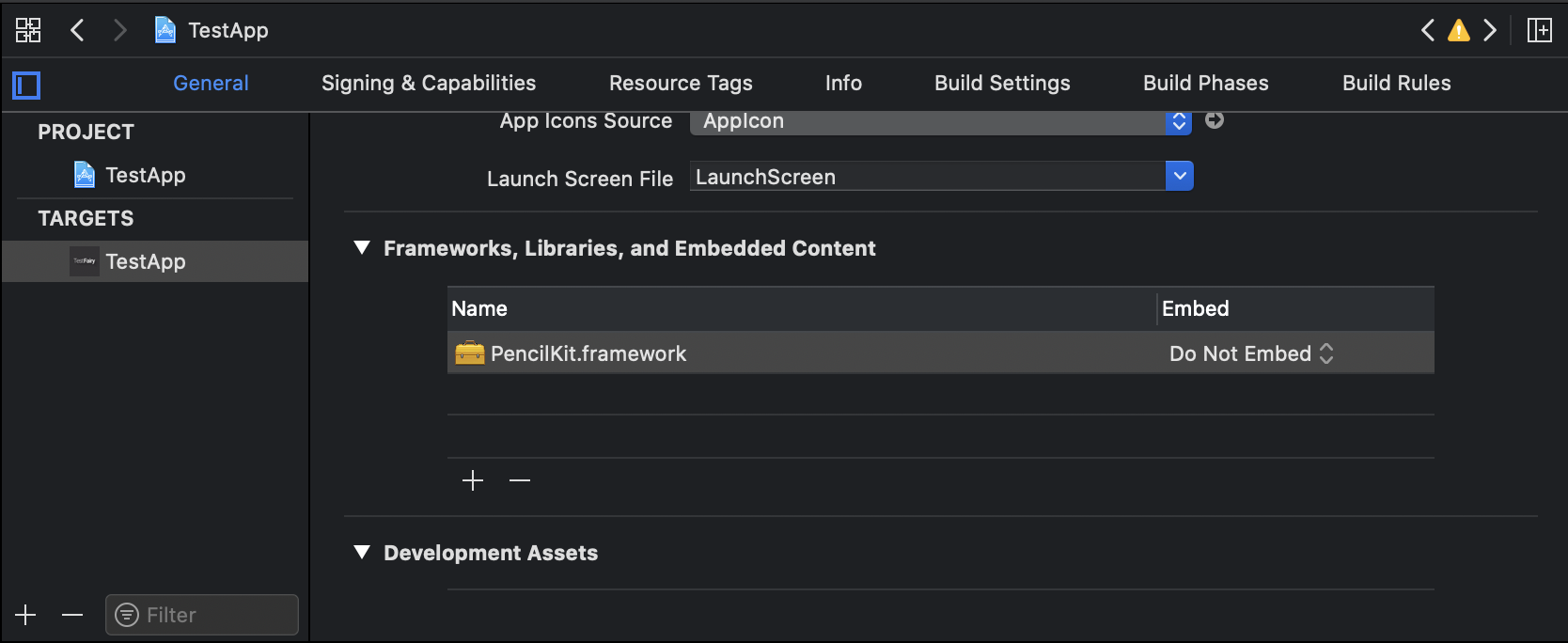
If a screenshot is attached to the feedback, your users can edit the screenshot by tapping on it and using PencilKit to mark it up.