Using Sauce Mobile Beta with Backtrace
Beta release
The Sauce Mobile Beta SDK is in beta. The artifact names and the API are final; this documentation can still change. Share feedback with your Sauce Labs representative.
The Sauce Mobile Beta SDK and Backtrace (Sauce Labs Error Reporting) run side by side in one app. This guide describes the contract that makes that possible: Backtrace owns crashes, Sauce Mobile Beta owns beta sessions, and the SDK gives every session a correlation id that it attaches to the session and hands to Backtrace, so a crash report and its session recording can be matched across the two consoles.
Overview
A process can have only one owner of its signal and exception handlers. The Sauce Mobile Beta SDK never installs one, at any layer and on any platform, so Backtrace is always the sole crash owner. The two SDKs are designed to run in the same app.
| Product | Owns |
|---|---|
| Backtrace | Native crashes (iOS, Android JVM and NDK), JavaScript errors and unhandled promise rejections (React Native), out-of-memory detection, symbolication |
| Sauce Mobile Beta SDK | Beta sessions and video, tester feedback and screenshots, remote logs and events, session attributes, the correlation id of every session, tester workflow |
Import the TestFairy module on iOS, com.testfairy.TestFairy on Android, and the TestFairy default export in React Native. On every platform, beginWithoutCrashHandler is the entry point for an app that runs Backtrace: it starts a session and never installs a crash handler.
Before You Begin
Install both SDKs.
- Install Backtrace for your platform: iOS, Android (plus Native Crash Integration if you want NDK crashes), or React Native. New to Backtrace? Start with Getting Started.
- iOS: any current Backtrace iOS SDK release. The SDK writes through the
attributesproperty ofBacktraceClient.shared. - Android: use Backtrace Android SDK 3.7.14 or later, which added
BacktraceClient.addAttribute. 3.14.0 or later is recommended. On 3.7.13 or earlier, the SDK falls back to the client's attribute map andBacktraceDatabase.addAttribute. See Configuring Backtrace for Android. - React Native: use
@backtrace/react-native0.2.3 or later. Until 0.2.3 is published as stable, install it from thercdist-tag:npm install @backtrace/react-native@rc. That release forwards attributes added afterinitialize()to native crash reports; 0.2.2 does not.
- iOS: any current Backtrace iOS SDK release. The SDK writes through the
- Install the Sauce Mobile Beta SDK: iOS, Android, or React Native.
- On Android, use Backtrace's
minSdk(21) for the combined app. Sauce Mobile Beta alone supportsminSdk16.
Initialization Order
Initialize in this order on every platform:
- Initialize Backtrace. It installs the crash handlers. Pass the attributes your app owns, such as
sauce.environment, at initialization. - On Android, pass the Backtrace client to
setBacktraceClient; on iOS and in React Native there is nothing to wire. Set the attributes your app owns withsetAttribute. - Set the server endpoint from Organization Settings > SDK Settings with
setServerEndpoint(the SDK's built-in default server is no longer in service), then start Sauce Mobile Beta withbeginWithoutCrashHandler.
The SDK links the two products itself. At every session start, it generates a new sauce.correlation_id, attaches it to the session, and writes the full set of SDK-managed attributes into the Backtrace client through Backtrace's public API: BacktraceClient.shared on iOS, the client you pass to setBacktraceClient on Android, and BacktraceClient.instance in React Native. It writes them again when the start response arrives. A client passed to setBacktraceClient after the session started receives the current attributes immediately; a client assigned to BacktraceClient.shared after the first session start is picked up at the next session start, because the SDK resolves shared only when it writes.
- Android
- iOS
- React Native
BacktraceDatabaseSettings to the BacktraceClient constructor. The attributes-only constructor creates a disabled database, and enableNativeIntegration() then silently does nothing. Use the /json submission URL and keep enableNativeIntegration() as the last Backtrace setup call. Then pass the client to TestFairy.setBacktraceClient. The SDK calls addAttribute, which updates both JVM and native (Crashpad) reports on Backtrace Android SDK 3.7.14 or later. The parameter is typed Object, so the SDK has no compile-time dependency on Backtrace and calls its public API reflectively.import android.app.Application;
import backtraceio.library.BacktraceClient;
import backtraceio.library.BacktraceCredentials;
import backtraceio.library.models.BacktraceExceptionHandler;
import backtraceio.library.models.database.BacktraceDatabaseSettings;
import com.testfairy.TestFairy;
import java.io.File;
import java.util.HashMap;
import java.util.Map;
public class MainApplication extends Application {
private BacktraceClient backtrace;
@Override
public void onCreate() {
super.onCreate();
// 1. Backtrace first: sole JVM and native crash owner.
Map<String, Object> appAttributes = new HashMap<>();
appAttributes.put("sauce.environment", "beta");
backtrace = new BacktraceClient(
getApplicationContext(),
new BacktraceCredentials("https://submit.backtrace.io/<universe>/<backtrace-token>/json"),
new BacktraceDatabaseSettings(new File(getFilesDir(), "backtrace").getAbsolutePath()),
appAttributes);
BacktraceExceptionHandler.enable(backtrace);
backtrace.enableNativeIntegration(); // keep last
// 2. Link Backtrace, set the server endpoint, then start the SDK.
TestFairy.setBacktraceClient(backtrace);
TestFairy.setAttribute("sauce.environment", "beta");
TestFairy.setServerEndpoint("<server-endpoint>"); // Organization Settings > SDK Settings
TestFairy.beginWithoutCrashHandler(getApplicationContext(), "<sauce-mobile-beta-token>");
}
}
These releases have no BacktraceClient.addAttribute. The SDK then writes each key into the client's attribute map and, through the client's public database field, into the native database with BacktraceDatabase.addAttribute. No code changes are needed, but upgrade when you can.
BacktraceClient.shared before beginWithoutCrashHandler. At every session start the SDK resolves BacktraceClient.shared through the Objective-C runtime, reads its attributes, merges the SDK-managed keys in, and assigns the result. That setter is what writes attributes into native crash reports, so every session start rewrites them there. Use the /plcrash submission URL.@import Backtrace;
#import "TestFairy.h"
- (BOOL)application:(UIApplication *)application didFinishLaunchingWithOptions:(NSDictionary *)launchOptions {
// 1. Backtrace first: sole crash owner.
BacktraceCredentials *credentials = [[BacktraceCredentials alloc]
initWithSubmissionUrl:[NSURL URLWithString:@"https://submit.backtrace.io/<universe>/<backtrace-token>/plcrash"]];
BacktraceClientConfiguration *configuration = [[BacktraceClientConfiguration alloc] initWithCredentials:credentials];
BacktraceClient.shared = [[BacktraceClient alloc] initWithConfiguration:configuration error:nil];
BacktraceClient.shared.attributes = @{ @"sauce.environment": @"beta" };
// 2. Server endpoint from Organization Settings > SDK Settings, then start the SDK.
// It links BacktraceClient.shared on its own.
[TestFairy setAttribute:@"sauce.environment" withValue:@"beta"];
[TestFairy setServerEndpoint:@"<server-endpoint>"];
[TestFairy beginWithoutCrashHandler:@"<sauce-mobile-beta-token>"];
return YES;
}
import UIKit
import Backtrace
import TestFairy // the SwiftPM product is SauceMobileBeta

@main
final class AppDelegate: UIResponder, UIApplicationDelegate {
    func application(_ application: UIApplication,
                     didFinishLaunchingWithOptions launchOptions: [UIApplication.LaunchOptionsKey: Any]?) -> Bool {
        // 1. Backtrace first: sole crash owner.
        let credentials = BacktraceCredentials(
            submissionUrl: URL(string: "https://submit.backtrace.io/<universe>/<backtrace-token>/plcrash")!)
        let configuration = BacktraceClientConfiguration(credentials: credentials)
        BacktraceClient.shared = try? BacktraceClient(configuration: configuration)
        BacktraceClient.shared?.attributes = ["sauce.environment": "beta"]

        // 2. Server endpoint from Organization Settings > SDK Settings, then start the SDK.
        //    It links BacktraceClient.shared on its own.
        TestFairy.setAttribute("sauce.environment", withValue: "beta")
        TestFairy.setServerEndpoint("<server-endpoint>")
        TestFairy.beginWithoutCrashHandler("<sauce-mobile-beta-token>")
        return true
    }
}
BacktraceClient.shared, pass it to setBacktraceClient: (TestFairy.setBacktraceClient(client) in Swift) before beginWithoutCrashHandler. nil restores the automatic discovery. If Backtrace is linked into the app but BacktraceClient.shared is nil at the first session start, the SDK logs one warning that names setBacktraceClient.@backtrace/react-native 0.2.3 or later installed, there is nothing to register. The package forwards the SDK-managed attributes to BacktraceClient.instance.addAttribute(...) at every session start.import { BacktraceClient } from '@backtrace/react-native';
import TestFairy from '@saucelabs/mobile-beta-react-native';
export function initializeObservability() {
// 1. Backtrace first: sole crash owner (JS errors, native crashes).
const backtrace = BacktraceClient.initialize({
url: 'https://submit.backtrace.io/<universe>/<backtrace-token>/json',
userAttributes: { 'sauce.environment': 'beta' },
database: {
enable: true,
captureNativeCrashes: true,
createDatabaseDirectory: true,
path: `${BacktraceClient.applicationDataPath}/backtrace`,
},
});
// 2. Server endpoint (Organization Settings > SDK Settings), then start the SDK. It never installs a crash
// handler. With @backtrace/react-native installed, it hands its attributes to BacktraceClient.instance at every session start.
TestFairy.setAttribute('sauce.environment', 'beta');
TestFairy.setServerEndpoint('<server-endpoint>');
TestFairy.beginWithoutCrashHandler('<sauce-mobile-beta-token>');
return backtrace;
}
@backtrace/react-native (strict pnpm or Yarn PnP layouts), link the client explicitly with setBacktraceClient. Pass null to go back to BacktraceClient.instance.TestFairy.setBacktraceClient(myBacktraceClient);
beginWithoutCrashHandler forces the enableCrashReporter option (TFSDKEnableCrashReporterKey on iOS) to false even if you pass true. Plain begin(...) also starts a session without a crash handler, but the explicit call documents the contract in your code and is the recommended entry point.
How the SDK Writes to Backtrace
- The SDK writes synchronously, on the thread that starts the session, which is the main thread in practice, and again when the start response arrives. The values are strings.
- On iOS, it merges into
attributes, so the attributes your app set at initialization survive. On Android, it callsaddAttribute, which overwrites per key. In React Native, the package callsBacktraceClient.instance.addAttribute(map). Every write is the full set, so writing it again is harmless. - The SDK never depends on Backtrace at compile time. It resolves
BacktraceClient.sharedthrough the Objective-C runtime on iOS and callsaddAttributereflectively on Android, through public API only. - A failed write is logged once and never affects the session. If Backtrace is in the app but no client is linked at the first session start (
BacktraceClient.sharedis nil on iOS,setBacktraceClientwas not called on Android), the SDK logs one warning that names the call to make.
What the SDK Sets Automatically
The SDK manages the following attributes. It attaches some of them to the session and writes all of them to Backtrace.
| Attribute | Value | When | On the session | In Backtrace |
|---|---|---|---|---|
sauce.correlation_id | Lowercase UUID v4, new for every session | At every session start, before the start request is sent | Yes | Yes, overwritten |
sauce.mobile_beta.session_started | "false" at session start, "true" once Sauce Labs accepts the session, "false" if the start fails | At every session start and again when the start response arrives | No | Yes, overwritten |
sauce.mobile_beta.session_url | Empty at session start, then the URL of the session recording | At every session start and again when the start response arrives | No | Yes, overwritten |
sauce.sdk.coexistence_mode | backtrace_crash_owner | At every session start | Yes | Yes |
sauce.release | <appId>@<version> (for example com.example.app@1.2.3), from the bundle or package and the marketing version | At every session start | No, the session already carries the version | Yes |
sauce.dist | Build number (CFBundleVersion or versionCode) | At every session start | No | Yes |
sauce.correlation_id, sauce.mobile_beta.session_started, and sauce.mobile_beta.session_url are reserved. setAttribute ignores them, logs a warning once per key, and returns true on iOS and Android, so a value your app sets never replaces the one the SDK generated for the session. The 64-attribute limit counts your own keys only.
Two attributes stay with your app, because the SDK cannot know them. Set them with setAttribute and pass them to Backtrace at initialization:
| Attribute | Value | Why |
|---|---|---|
sauce.environment | beta, production, or your own environment name | Separates beta traffic from other environments in both consoles. |
mad.distribution_id | Your Mobile App Distribution build id | Optional. Set it only when configured, so filters never see an empty string. |
The values are copies, not references: nothing joins the two products server-side, so a report and a session match because the SDK wrote the same value to both.
Reading the Correlation Id
Read the current id with sessionCorrelationId, or implement the session-state callback to learn every new id. The callback fires at session start, before the start request is sent, so the id is available while Sauce Labs is still accepting the session. Use the id to tag your own logs or analytics events.
- Android
- iOS
- React Native
import com.testfairy.SessionStateListener;
import com.testfairy.TestFairy;

String correlationId = TestFairy.getSessionCorrelationId(); // null before the first session start

TestFairy.addSessionStateListener(new SessionStateListener() {
    @Override
    public void onSessionCorrelationIdChanged(String correlationId) {
        Log.i("MyApp", "Session correlation id: " + correlationId);
    }
});
#import "TestFairy.h"

NSString *correlationId = [TestFairy sessionCorrelationId]; // nil before the first session start

// In a TestFairySessionStateDelegate registered with [TestFairy setSessionStateDelegate:self]
- (void)sessionCorrelationIdDidChange:(NSString *)correlationId {
    NSLog(@"Session correlation id: %@", correlationId);
}
import TestFairy

let correlationId = TestFairy.sessionCorrelationId() // nil before the first session start

// In a TestFairySessionStateDelegate registered with TestFairy.setSessionStateDelegate(self)
func sessionCorrelationIdDidChange(_ correlationId: String) {
    print("Session correlation id: \(correlationId)")
}
import TestFairy from '@saucelabs/mobile-beta-react-native';

const correlationId = await TestFairy.getSessionCorrelationId(); // null before the first session start

const subscription = TestFairy.addSessionStateListener({
  onSessionCorrelationIdChanged: ({ correlationId }) => console.log(`Session correlation id: ${correlationId}`),
  onSessionStarted: ({ sessionUrl, correlationId }) => console.log(`Session ${correlationId} is recording at ${sessionUrl}`),
});
A crash belongs to the session that was running when it happened, and one launch can contain several sessions. The SDK starts a new session after stop() and a resume, when the app returns to the foreground after a background stop, when the maximum session length is reached, and after the update prompt is dismissed. Generating sauce.correlation_id at every session start, before the start request is built, guarantees that the report Backtrace writes at crash time and the recording Sauce Mobile Beta made up to that moment carry the same value, and that no two sessions share it. A crash between sessions carries the id of the last session. For identity that spans sessions and launches, use setUserId with your real user id. Do not reuse the correlation id for that.
Limits on the Sauce Mobile Beta side: 64 attributes per session, keys up to 64 characters, values up to 1000 characters on iOS and 1024 on Android. On iOS and Android, setAttribute returns false when a value is rejected. The React Native binding returns nothing. Set your own attributes before beginWithoutCrashHandler. The SDK keeps them and attaches them to every session it starts, including sessions started after stop().
Do not use setCorrelationId or identify for the correlation id. Both are deprecated and write the user-identity field that setUserId writes (on Android only once per process), so they would collide with your real user id. The SDK sets sauce.correlation_id itself. Keep setUserId for the user and read the id with sessionCorrelationId. See Identifying Your Users and Session Attributes.
Finding a Crash's Session
-
Index the attributes in Backtrace. Backtrace lets you filter and group on a custom attribute only after it has been indexed once per project under Project Settings > Attributes. Index
sauce.correlation_idwith the UUID format (select Miscellaneous, then UUID), andsauce.mobile_beta.session_urlas a string. See Indexing Attributes. -
From a crash report, copy the
sauce.correlation_idvalue and search for it in the Sauce Labs Mobile App Distribution session list. Exactly one session carries that value: the one that was running when the crash happened.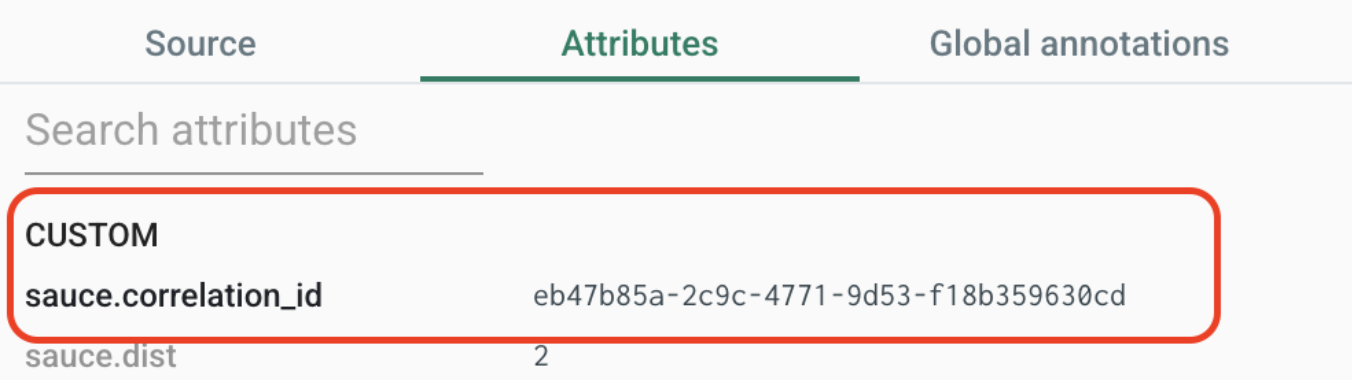
-
Or follow
sauce.mobile_beta.session_urlfrom the report directly to the recording. It points at that same session. Ifsauce.mobile_beta.session_startedis"false", the crash happened before Sauce Labs accepted the session, for example offline. The report still carries the id, and the search returns no session.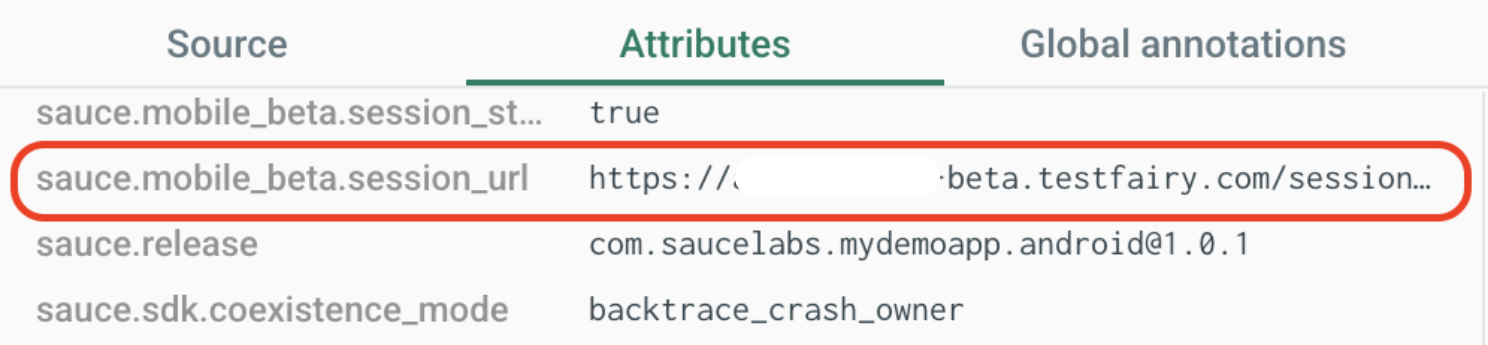
In the other direction, filter Backtrace on sauce.correlation_id with the value shown on a session's attributes to see whether that session crashed.
Linking Jira Tickets to Sessions
If you create Jira tickets from Backtrace, each ticket can link to the session behind the crash. The link needs both the Mobile App Distribution URL and the indexed sauce.correlation_id attribute. Without either one, tickets are still created, but without the link.
-
Set up the Jira integration for your Backtrace project. See Connect to Jira.
-
In the Jira integration settings, enter your Mobile App Distribution URL. If you don't know it, contact Sauce Labs Support. See Mobile App Distribution URL.
-
Index
sauce.correlation_idin the Backtrace project. Go to Project Settings > Attributes, click +, and enter:- Name:
sauce.correlation_id. It must match exactly. - Description: Any text, for example
Mobile App Distribution session correlation id. - Format: Select Miscellaneous, then UUID. Type changes to UUID automatically.
See Indexing Attributes.
- Name:
New tickets then include a View Mobile App Distribution session link.
Crash APIs
These methods exist in the API and do nothing: installCrashHandler, enableCrashHandler, and disableCrashHandler. didLastSessionCrash always returns false. In React Native, isCrashReportingAvailable() returns false and getIntegrationInfo().coexistenceMode is backtrace_crash_owner. Use Backtrace for crash history.
Production Builds
Keep the Sauce Mobile Beta SDK out of store builds and ship Backtrace in every build. Backtrace is designed for production crash reporting. The Sauce Mobile Beta SDK records sessions for testers. On Android, declare the SDK with debugImplementation or in a beta flavor so release variants never package it. On iOS, gate the calls behind a build setting or a no-op wrapper. Sauce Mobile Beta SDK in Production describes the options, including the no-op wrapper pattern.
The SDK-managed attributes exist only while the SDK runs. In a build that does not include it, Backtrace reports carry none of them, so set the attributes you want in production, such as sauce.release and sauce.dist, on Backtrace yourself. sauce.environment is yours on every build.
Reference Apps
This pattern is implemented in the React Native package's example app, which runs the released SDK: testfairy/react-native-testfairy, release 3.1.0. See example/src/observability.ts.
The Sauce Labs demo apps, My Demo App for iOS and My Demo App for Android, are being updated to the released SDKs. Their current releases (2.3.0) still pin a release candidate of the SDK and carry app-side correlation code (an app-generated UUID, session-URL mirroring, app-set sauce.release and sauce.dist) that the SDK now replaces; do not copy that code.
To try it, run the React Native example app with your own Backtrace submission URL, Sauce Mobile Beta token and server endpoint, then trigger a crash with its Native crash or JS crash button. The process dies as a genuine crash. The Sauce Mobile Beta SDK does not intercept it. Relaunch the app: Backtrace uploads the pending report while Sauce Mobile Beta starts a new session. Open the report, copy its sauce.correlation_id, and search for it in the session list to land on the recording of the session that crashed. The example app also has a Stop and resume session action, which starts a second session with a new id, so you can confirm that a crash in the second session is matched to that session only.